
Radio & SDR / Tool reference
SDRNova T25
A trunk-tracking radio scanner for Android that follows P25 systems and decodes DMR from a USB software-defined radio plugged into a phone or tablet.
Pre-release · v0.4.2 GPL-3.0 KotlinJavaJetpack Compose
What problem does SDRNova T25 solve?
Trunk-tracking scanners such as sdrtrunk run on desktop computers; the repository describes SDRNova T25 as the Android counterpart that did not exist yet. It brings control-channel following, voice decoding, call logging and recording to a phone or tablet with a USB SDR attached.
Is it ready to use?
v0.4.2, published November 3, 2026, is the latest GitHub release and the revision reviewed here: a test APK signed with a development key. Its notes, like those of every release so far, say it is still untested on real hardware.
What does SDRNova T25 do?
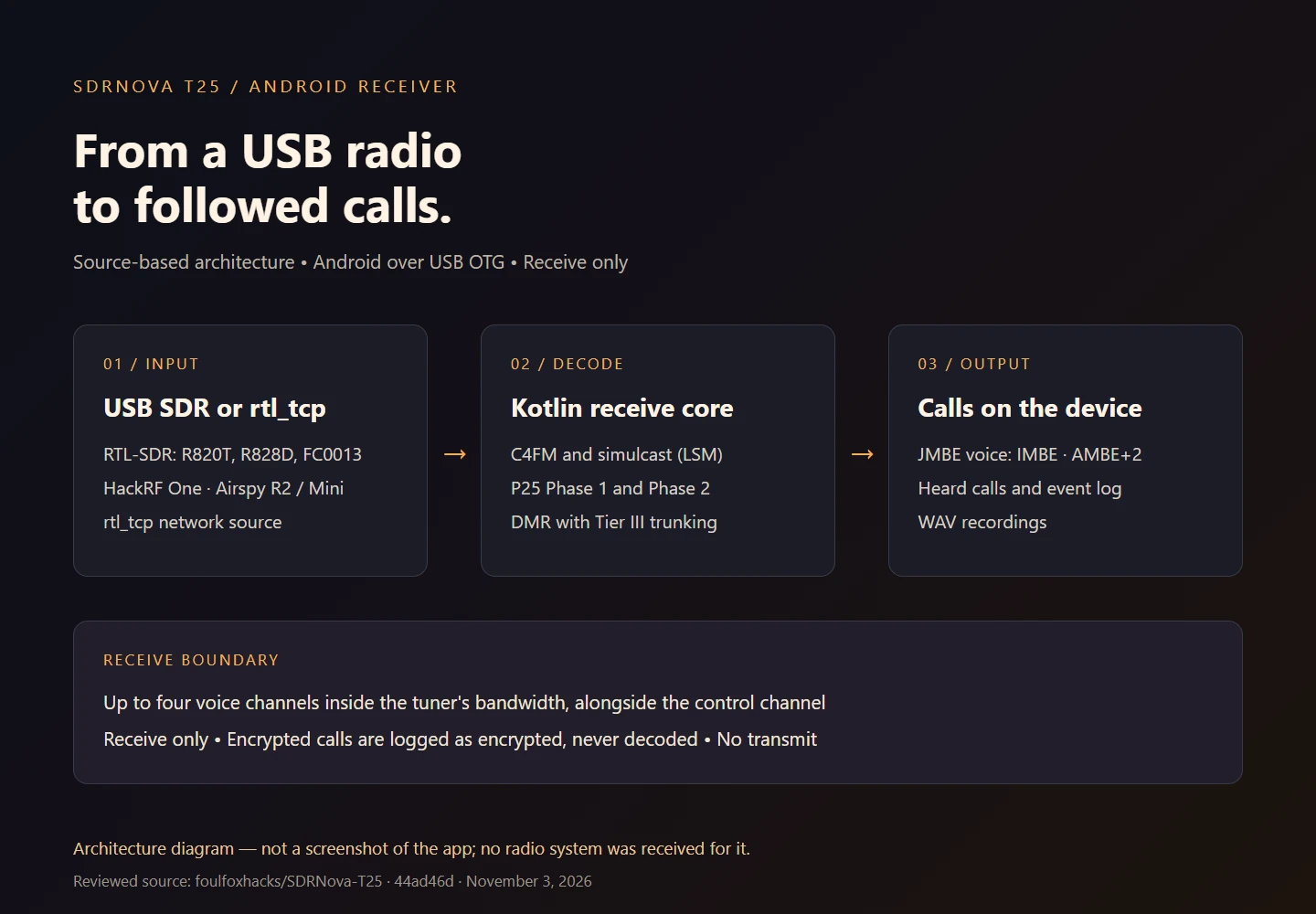
- Decode a P25 Phase 1 control channel: band plan, site identity, voice grants resolved to frequencies, and active and recent calls, from C4FM or simulcast (LSM) sites. When a control channel goes quiet, the radio tries the site's other control channels.
- Follow voice grants onto up to four channels alongside the control channel, as long as they sit inside the tuner's bandwidth, including P25 Phase 2 two-slot TDMA channels per timeslot.
- Monitor one DMR frequency, repeater or direct mode, with talkgroup and radio ID per timeslot, and follow DMR Tier III voice grants onto their channel and timeslot with a channel map.
- Run Auto mode, which decodes P25 and DMR side by side on one frequency and shows which it found.
- Hear voice through the built-in JMBE vocoder (IMBE for Phase 1, AMBE+2 for Phase 2 and DMR), with one call on the speaker at a time.
- Import and export sdrtrunk playlists and DSD+ talkgroup and radio lists, scan the ticked channels, hold, skip or lock out a call, set priorities, and record calls to WAV.
- Add a county's systems from RadioReference with a Premium Subscription, or manage channels and talkgroup aliases from a PIN-protected web dashboard on the same Wi-Fi network.
- Use RTL-SDR dongles (R820T, R820T2, R828D including the RTL-SDR Blog V4, and FC0013), HackRF One, Airspy R2 and Mini, or an rtl_tcp server, with a spectrum and waterfall to tap-tune from.
How do I install SDRNova T25?
Before you install
- An Android device with USB OTG host mode. The releases install on Android 8.0 or newer; the README recommends Android 10 or newer on a 64-bit ARM device with 6 GB of RAM.
- A supported USB SDR, and a powered OTG hub for an Airspy or HackRF, which phones generally cannot power on their own.
- For a source build: JDK 17 or newer and the Android SDK with platform 35 and build-tools 35.0.0. The code is pure Kotlin and Java, so no NDK is needed.
Sideload the signed APK from the releases page, or build the app from the reviewed source:
git clone https://github.com/foulfoxhacks/SDRNova-T25.git
cd SDRNova-T25
./gradlew :core:test           # DSP and decoder tests on the desktop JVM
./gradlew :app:assembleRelease # signed with the local debug key
The build guide recommends the release build over the debug build, because the signal-processing loop runs much faster when the app is not debuggable. To start monitoring, connect the SDR through USB OTG, accept the USB prompt, and tap a channel on the Channels screen.
What are the known limits?
- Every release so far is a pre-release that its notes describe as untested on real hardware, and the README calls T25 a concept build whose interfaces and playlist format will change between builds.
- Not yet supported at the reviewed revision: DMR Capacity Plus and Connect Plus trunking, DMR Tier III absolute-frequency grants, DMR late entry and talker alias, Phase 2 on 4-slot channels and Phase 2 control channels, AM, streaming, and E4000 tuners over USB (they work through rtl_tcp). SDRplay RSP is not supported.
- Receive only, with no decryption: encrypted calls are detected and logged as encrypted, and nothing more.
- Radio monitoring law varies by country and, in the US, by state; receiving, recording and rebroadcasting are separate questions. IMBE and AMBE+2 are patent-encumbered in some jurisdictions, as the README notes.
Where is the documentation?
What is the license?
The README declares GPL-3.0; the reviewed revision has no standalone LICENSE file. The built-in JMBE vocoder by Dennis Sheirer is GPL-3.0, with its own license file, and the build guide credits sdrtrunk (GPL-3.0) as the model for the receive chain. Read the GPL-3.0 license.
What changed recently?
v0.4.2 built a RadioReference key into the app. v0.4.1 fixed USB streaming and added the scanner-style interface, Auto mode, DMR Tier III trunking and the web dashboard. v0.4.0 added the built-in vocoder, sdrtrunk playlists, scan, simulcast and recording. Each release lists the APK's SHA-256.