foulfoxhacks.dev Sammy's developer side

Display settings

Theme
Text size
Reading and motion

Saved in this browser only.

Loading recently played…

Development

Projects

A first-party record of what I build, the tools I use, and the projects that support each capability claim.

Web diagnostics

SEO-INDEX VariScripts

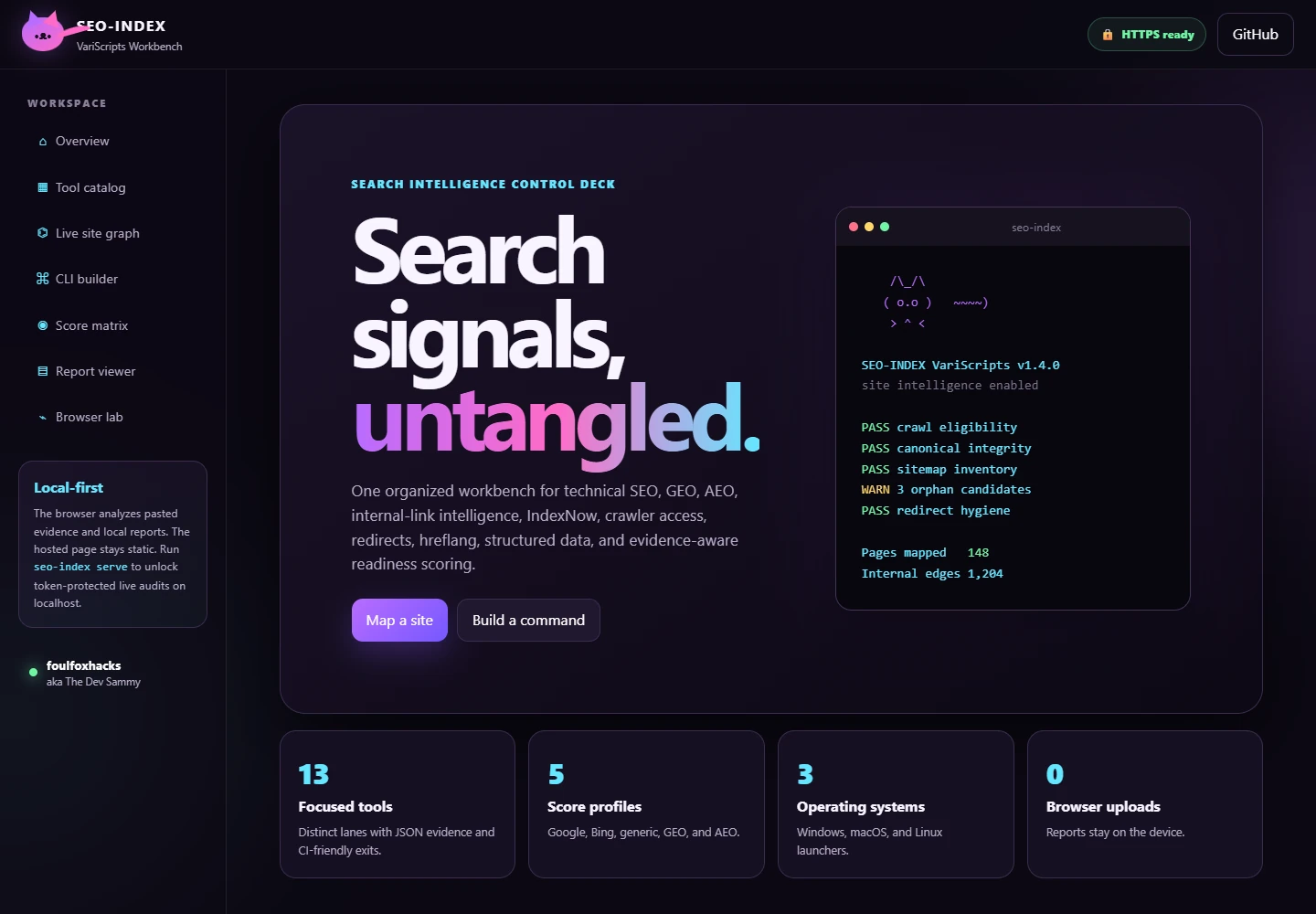
Cross-platform technical SEO, indexing, GEO and AEO diagnostics with a command-line toolkit and a local graphical workbench.

Crawl access, redirects, canonical URLs, structured data and internal links can disagree. This toolkit collects that evidence in one workflow so site owners can investigate the disagreement before changing their site.

Source release · v1.4.0 in README PythonPowerShellShellJavaScript MIT

  • Page Quality Audit checks page metadata, crawl eligibility, images, accessibility signals, response headers and JSON-LD.
  • Internal Link Graph reports click depth, dead ends, orphan candidates, duplicate titles and links to broken or redirected pages.
  • Redirect Lab, Crawler Access Matrix, Hreflang Auditor, Canonical Guard and Sitemap Doctor provide focused investigations.
  • Export JSON and Markdown evidence, or explore the standalone HTML link graph.
  • Run a loopback-only workbench with a session token and bounded, host-scoped audit requests.
Known limits
  • Toolkit scores are diagnostic heuristics, not Google or Bing scores. They do not guarantee indexing, rankings or AI citations.
  • Live checks depend on the target server, network conditions and crawler-access policy. A crawler user-agent comparison does not prove how a search engine has indexed a page.
Source on GitHub Open the hosted workbench Full write-up ↗

SEO-INDEX VariScripts hosted diagnostic workbench
The public hosted workbench, captured September 7, 2026. This is the evidence-review interface, not a measured audit result.

Streaming tools

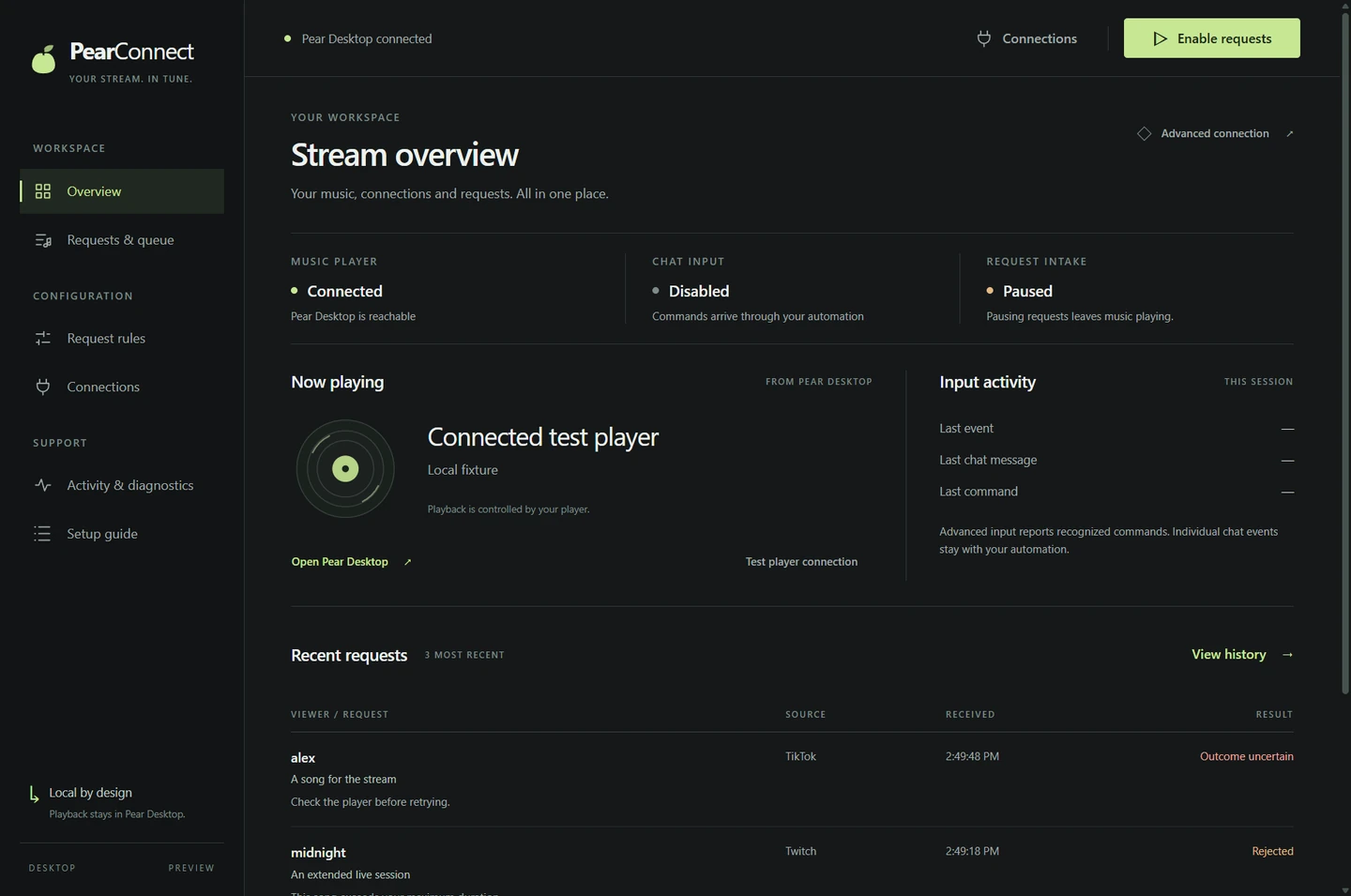
PearConnect Song Requests

A local-first song-request bridge that connects Twitch, TikTok through TikFinity, and YouTube Live to a shared Pear Desktop queue.

Requests from several streaming platforms need one queue, consistent rules and a way for the streamer to verify the player connection. PearConnect brings the adapters, request rules and local controls together.

Beta · v0.3.0-beta.5 JavaScriptNode.js MIT

  • Use the desktop console or CLI with the same local request engine.
  • Combine Twitch, TikTok through TikFinity, and YouTube Live requests under shared queue rules.
  • Configure cooldowns, length checks, a blocklist and allowlisted skip controls.
  • Use now-playing, next-track and live-player queue overlays, including a portrait TikTok Studio layout.
  • Validate configuration and rehearse requests in dry-run mode before accepting live requests.
Known limits
  • The README records an upstream YouTube Music Desktop 3.11.0 queue compatibility issue: an enqueue acknowledgement may arrive without a new player queue entry. Verify actual playback; the bridge does not repair the player.
  • The YouTube adapter is unofficial and cannot reply in chat. TikTok Simple mode also has no chat-reply path. Select one TikTok input mode to avoid duplicate requests.

Source on GitHub v0.3.0-beta.5 release notes and downloads Visit the PearConnect site Full write-up ↗

PearConnect desktop console with connection and queue controls
Desktop overview supplied in the PearConnect repository. This is a repository screenshot, not a claim that a live player session was tested for this page.

Streaming tools

TikCord Presence

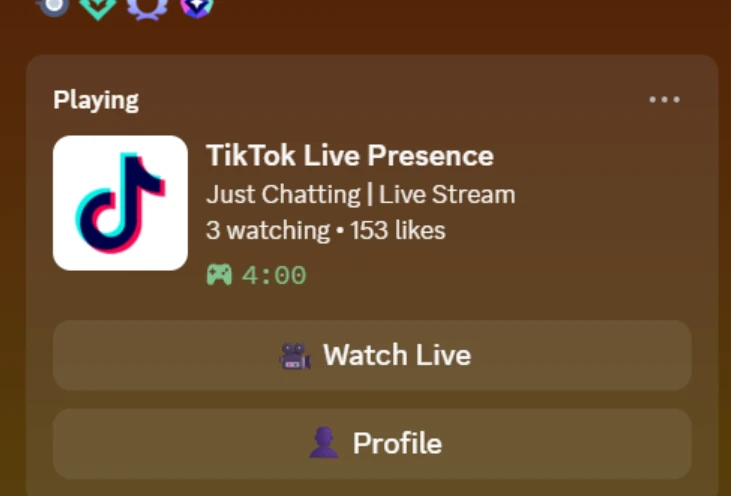
A Node.js and TypeScript bridge that mirrors TikTok LIVE status into Discord Rich Presence with stream details and watch/profile buttons.

TikTok LIVE activity and a Discord desktop profile are separate systems. TikCord forwards live-room state to the local Discord client so a profile can show that a stream is running and where to watch it.

Released · v1.0.1 TypeScriptNode.js MIT

  • Detect live sessions and clear Discord activity when a stream ends or disconnects.
  • Display the stream title, viewer count and like count.
  • Provide Watch Live and Profile buttons on the activity card.
  • Reconnect after TikTok connection drops and send rate-aware presence updates every 15 seconds.
  • Configure the TikTok username, Discord application ID and artwork key in one local environment file.
Known limits
  • The TikTok connector uses an unofficial API and may break when TikTok changes its service.
  • Discord hides activity buttons on your own profile and on mobile. Verify buttons from another account viewing your desktop activity.

Source on GitHub v1.0.1 release Full write-up ↗

TikCord example TikTok LIVE activity card in Discord
The activity preview supplied in TikCord's README. Displayed stream details are part of the example image, not current live status.

Editor integrations

UnityCord Presence

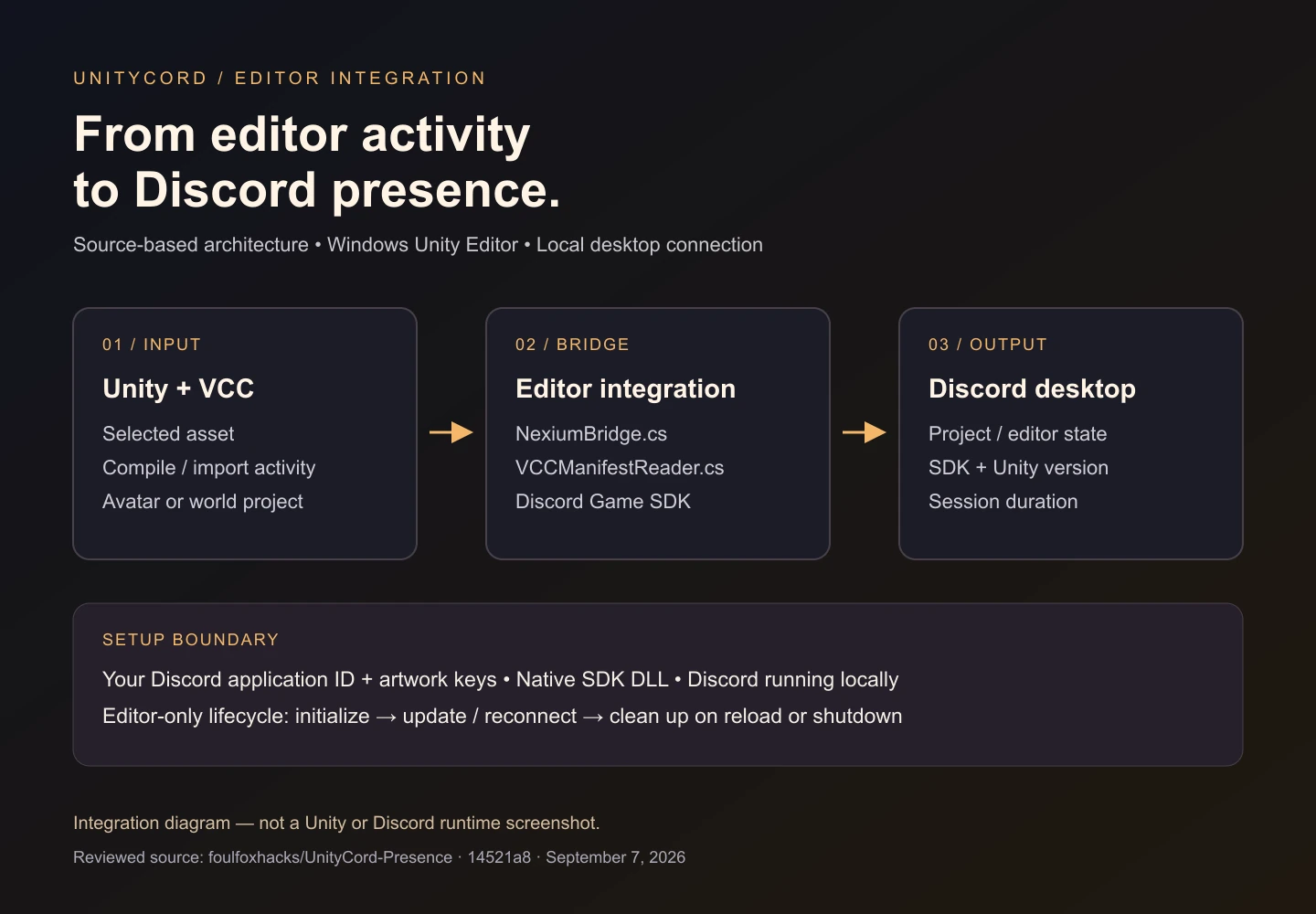
Editor-only Discord Rich Presence for Unity and VRChat Creator Companion projects, with project detection and editor activity updates.

A generic Unity activity label does not explain which kind of VRChat project is open or what the editor is doing. UnityCord reads local editor and VCC state to build a more specific Discord presence.

Source integration · release tag C# MIT — declared in README

  • Initialize the integration when the Unity Editor loads.
  • Detect avatar and world projects through Packages/vpm-manifest.json.
  • Reflect selected assets, compilation and asset import activity.
  • Include VCC SDK type, package count, Unity version and session duration.
  • Reconnect to Discord and clean up native SDK state during reload or shutdown.
Known limits
  • The documented platform is a 64-bit Windows editor. Do not infer macOS, Linux or in-game runtime support from the C# source alone.
  • The visual below explains the reviewed integration. A configured Unity/Discord session was not exercised for this page.

Source on GitHub Published release and assets Full write-up ↗

Unity and VCC editor signals pass through UnityCord and the Game SDK to Discord desktop
Source-based integration diagram created September 7, 2026. This is not a Unity or Discord runtime screenshot; no live Discord status or account configuration was changed to create it.

Web diagnostics

Rank Math for Next.js

An independent Next.js App Router port derived from Rank Math SEO 1.0.275, adapting its admin experience and runtime contracts beyond WordPress.

Rank Math's WordPress interfaces rely on WordPress routes, options and hooks. This port replaces those primitives with Next.js routes, components and adapters while retaining the original administrative structure.

Source port · no published GitHub release TypeScriptReactNext.js GPL-3.0-or-later

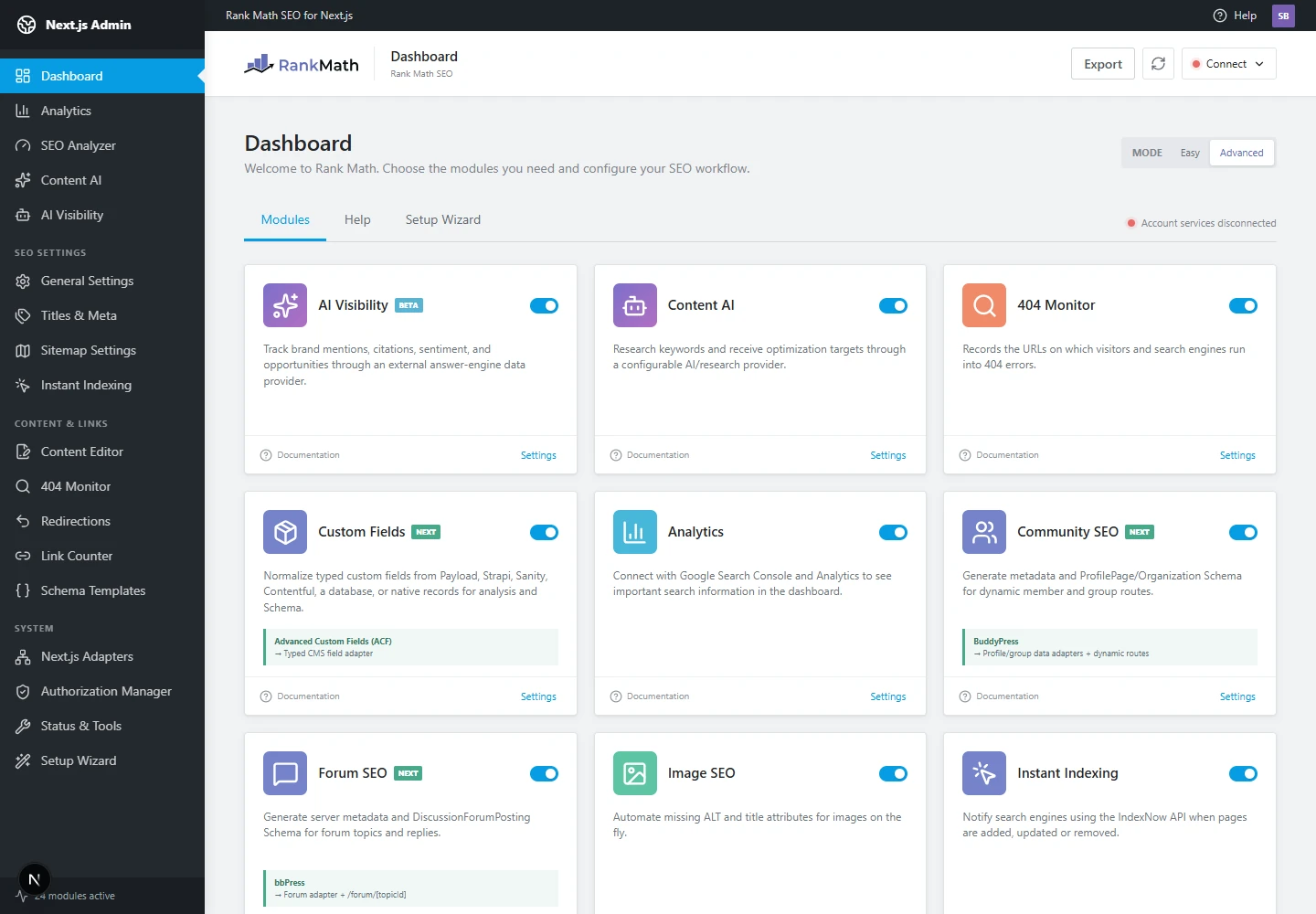
  • Adapt the dashboard, setup wizard, general settings, titles/meta and sitemap settings to Next.js routes.
  • Provide focus-keyword, readability, snippet, robots, schema and social-preview editing workflows.
  • Expose modules for analytics, SEO analysis, redirects, 404 monitoring, schema templates and link graphs.
  • Use Next-native adapters for metadata, sitemaps, robots, feeds and scheduled work.
  • Separate runtime storage, permissions, authorization and provider integrations behind contracts.
Known limits
  • This is an independent derivative port, not an official Rank Math integration. It is not affiliated with, endorsed by or supported by Rank Math.
  • The upstream baseline number does not certify feature parity, production readiness or paid-provider access. Review the adaptation notes and configure external integrations separately.
  • The local dashboard was launched for the screenshot with account services disconnected. This does not validate provider integrations, SEO outcomes or production readiness.

Source on GitHub Full write-up ↗

Rank Math for Next.js local module dashboard with account services disconnected
Actual local dashboard captured from the reviewed source on September 7, 2026, with account services disconnected. Module controls are the application's default development state, not proof of connected providers or measured SEO results.