
Streaming tools / Tool reference
TikCord Presence
A Node.js and TypeScript bridge that mirrors TikTok LIVE status into Discord Rich Presence with stream details and watch/profile buttons.
Released · v1.0.1 MIT TypeScriptNode.js
What problem does TikCord Presence solve?
TikTok LIVE activity and a Discord desktop profile are separate systems. TikCord forwards live-room state to the local Discord client so a profile can show that a stream is running and where to watch it.
Is it ready to use?
The latest reviewed GitHub release is v1.0.1, published May 13, 2026. Its README documents reconnect handling and the desktop setup workflow.
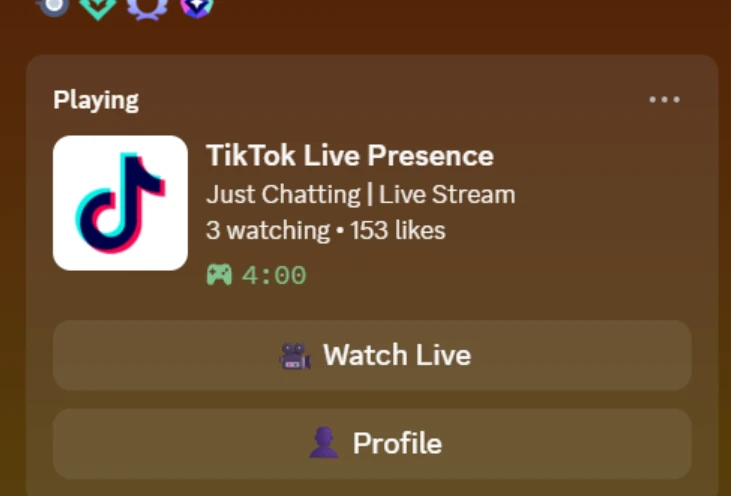
What does TikCord Presence do?
- Detect live sessions and clear Discord activity when a stream ends or disconnects.
- Display the stream title, viewer count and like count.
- Provide Watch Live and Profile buttons on the activity card.
- Reconnect after TikTok connection drops and send rate-aware presence updates every 15 seconds.
- Configure the TikTok username, Discord application ID and artwork key in one local environment file.
How do I install TikCord Presence?
Before you install
- The repository lists Node.js 18 or later. Choose a currently supported Node.js release compatible with the project rather than an end-of-life runtime.
- Run Discord desktop on the same machine and enable its activity-status display.
- Use a public TikTok account with LIVE access and your own Discord application with uploaded Rich Presence artwork.
Clone the source, install dependencies, then copy .env.example to .env. Configure the username, application ID and artwork key before starting:
git clone https://github.com/foulfoxhacks/TikCord-Presence.git
cd TikCord-Presence
npm install
# Copy .env.example to .env and edit it before continuing.
npm run dev
# For a compiled build instead:
# npm run build
# npm start
A Discord application ID is not a bot token. The setup guide explains artwork keys, local IPC and Discord activity-privacy settings.
What are the known limits?
- The TikTok connector uses an unofficial API and may break when TikTok changes its service.
- Discord hides activity buttons on your own profile and on mobile. Verify buttons from another account viewing your desktop activity.
Where is the documentation?
What is the license?
The reviewed repository includes an MIT license. This bridge is not an official TikTok or Discord product. Read the MIT license.
What changed recently?
v1.0.1 fixes reconnect handling after TikTok disconnects, adds package metadata and cleans up README encoding. The README also retains the v1.0.0 history.